
By DavidLundell September 26, 2025
Microsoft has had a lot of chefs in the Entra ID kitchen baking up solutions to different problems and now we have an array of confusing choices about where to put your data.
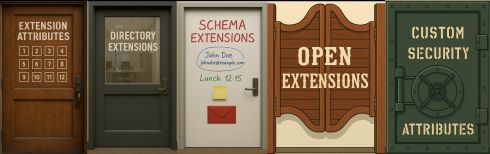
This is the first of a series of posts to help you choose the correct one for you and your needs.
While Microsoft’s official documentation provides a fairly handy comparison table it completely leaves out Custom Security Attributes. Overall, I find that there are some gaps, and a couple of contradictions but not a definitive guide to help you know when to use which extension.
In on-premises Active Directory(AD) we only had two choices :
- Extension Attributes
- Schema Extensions Additionally, we could create new object classes not just attributes.
The Extension Attributes were not part of the AD Schema until you applied the Exchange Schema Extensions and were created to give you 15 pre-canned places to put some custom string data without having to go through the scary and irreversible process of
EXTENDING THE SACRED ACTIVE DIRECTORY SCHEMA!
But you also couldn’t clearly label the attributes nor could you constrain by data type or anything else. The Extension Attributes in Entra are the cloud version of these.
In contrast AD Schema Extensions don’t have a perfect parallel in the Entra. Whereas Directory Extensions, Schema Extensions and Custom Security Attributes all have similarities to the on-premises AD Schema Extensions, Open Extensions are a completely different animal evoking images of the Wild West, where anything goes!
In some ways the easiest to use (Extension Attributes) can also be the hardest since you have to manage the population of the data very differently depending on whether the user is synced from on-premises AD or is cloud only. This limited resource is also the most important to choose what to do with since there are some use cases such as viewing on the profile card that only work for Extension Attributes.
We will start with their:
-
- so that you can realize when documentation and posts are talking about them
-
- So that you can recognize them when you see them in the wild
The decision tree to help you decide what works best for you.
Names and aliases (“an [extension] by any other name would” make web searches more confusing)
| Names | Alias | Additional Alias |
| Extension attributes | onPremisesExtensionAttributes | Custom attributes in Exchange Server |
| Directory Extensions | Custom Extension Attributes in Azure AD/Entra ID | Azure AD/Entra ID Connect Sync Directory Extensions |
| Schema Extensions | Microsoft Graph schema extensions | |
| Open Extensions | openTypeExtension | Office 365 data extensions |
| Custom Security Attributes | ||
Schema Extensions
is the most confusing because of the “Tenant Schema Extension App” which is registered during the installation of Entra Connect to hold is Directory Extensions. This will frequently turn up when searching the web for “Schema Extensions”.

Directory Extensions
are also confusing because they were created to solve the problem for DirSync, of what to do with on premises AD Attributes that don’t exist in Entra ID. DirSync which became Azure Active Directory Connect Sync and later Entra Connect Sync. So most of you have heard of these as AAD or Entra Connect Sync Directory Extensions, but they are also called Custom Extension Attributes in several articles, but so are the Extension Attributes. One article on Define custom attributes in Azure Active Directory B2C on refers to Directory extensions as:
- extension property
- custom attribute
- custom claim
One more element of confusion:
in the world of Office 365/Outlook resources (completely excluding directory resources) there is a legacy method of storing custom data known as extended properties. Don’t let this be confused with Extension Attributes, Directory Extensions, Schema Extensions, not Open Extensions. This is purely for Outlook resources on users, and groups. Further, the articles recommends using Open Extensions instead of extended properties.
Quick shoutout to Merill Fernando for his post in 2023 about the different ways to extend the Entra ID Schema.
I am intending to build on and update his good work, which did add Custom Security Attributes to the comparison table and also some use cases.